The clearest wedding photo QR code wording
A wedding photo QR code works only when guests understand what will happen after they scan it. The code can be technically perfect and still collect very few photos if the sign is vague, crowded, or displayed somewhere guests never pause.
The strongest default is: Scan to share your wedding photos — no app needed. It gives the action, the benefit, and the friction remover in one line. Personalize it with the couple's names when space allows: Share your photos with Maya and Jordan — no app needed.
- Action: scan, upload, share, or add
- Outcome: your wedding photos, favorite moments, or candids
- Friction remover: no app needed, works on any phone, or upload later
30 wedding photo QR code sign wording ideas
Choose one headline that fits the tone of the wedding. Keep the instruction short enough to read while standing, then place a short URL below the code as a backup.
- Scan to share your wedding photos.
- Add your photos to our wedding album.
- Share your favorite moments with us.
- Help us see the day through your eyes.
- Upload your wedding photos here.
- Scan, choose your photos, and share.
- Scan to share — no app needed.
- No app. No account. Just scan and upload.
- Open your camera, scan, and share.
- Share from any phone in a few taps.
- Your photos, our memories — no download required.
- Scan now and upload whenever you are ready.
- Share the moments we may have missed.
- Send us the laughs, hugs, and dance-floor photos.
- We would love to see the day through your camera.
- Help us collect every little moment.
- Your candid photos belong in our wedding story.
- Add your view of our best day.
- Pics or it did not happen — scan to share.
- Spotted a great moment? Send it our way.
- Keep the dance-floor evidence together.
- Camera roll gold goes here.
- You take the photos. We will keep the memories.
- Scan. Upload. Get back to the party.
- Welcome sign: Scan now so you are ready to share all day.
- Cocktail table: Caught a candid? Add it here.
- Bar: Sip, snap, and scan to share.
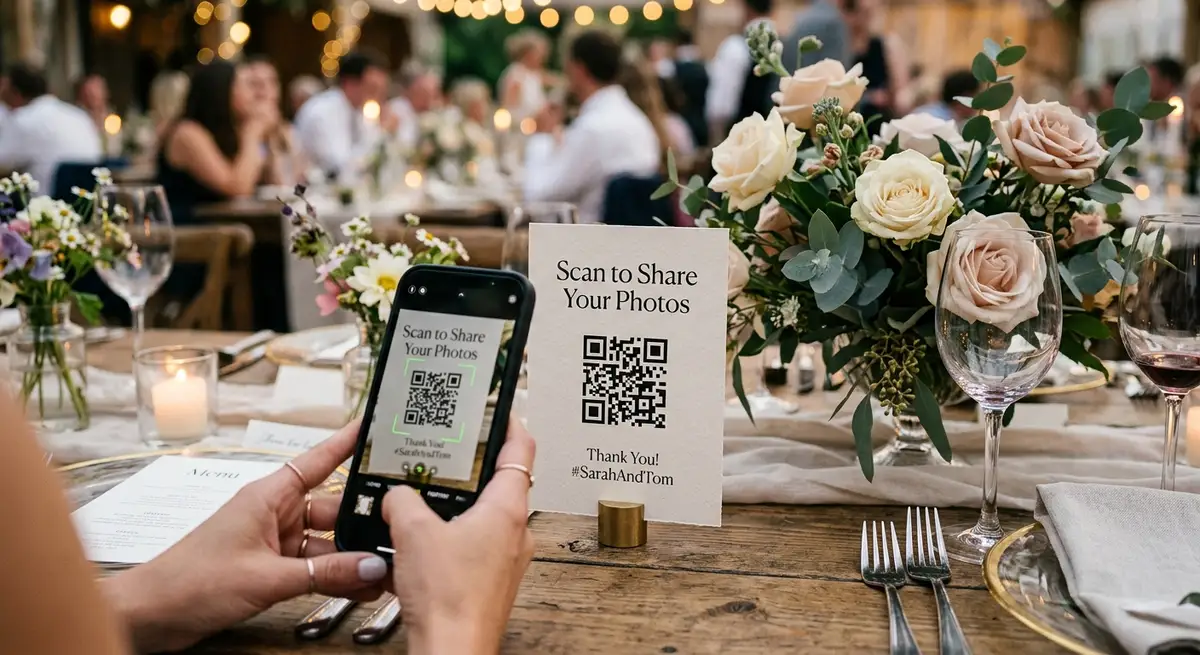
- Dinner table: Share your favorite photo from today.
- Guest book: Leave a note, then add a photo.
- Dance floor: Upload the moments the photographer missed.
Match the message to the sign placement
One large welcome sign is easy to overlook. Repeat the same QR destination at several natural pause points, but adjust the headline to the moment. Guests at the entrance need an early heads-up; guests at dinner respond better to a specific request; guests near the dance floor understand exactly which moments the couple wants.
The same browser-upload pattern works for weddings, birthdays, anniversaries, and baby showers; only the tone and location of the prompt need to change. Use the related use-case guides below for event-specific setup ideas.
| Placement | Best prompt | Why it fits |
|---|---|---|
| Welcome area | Scan now so you are ready to share all day | Guests are waiting and have time to scan |
| Cocktail tables | Caught a candid? Add it here | Phones are already out during conversation |
| Bar | Sip, snap, and scan to share | Short copy suits a busy location |
| Dinner tables | Share your favorite photo from today | A specific request is easier than a general one |
| Guest book | Leave a note, then add a photo | Connects two memory-making actions |
| Dance-floor edge | Upload the moments the photographer missed | Explains why the couple wants guest photos |
Wedding photo QR code sign layout checklist
Good wording cannot rescue a code that is difficult to scan. Keep the QR code visually simple and let the border, typography, and surrounding stationery carry the wedding style.
There is no universal printed size that works for every venue. Viewing distance, lighting, paper finish, camera quality, and the QR code itself all matter. Test the exact exported design from the farthest distance guests will realistically scan it.
- Use a plain, high-contrast background behind the code
- Keep a clear quiet margin around all four sides
- Do not stretch, crop, or place artwork over the code
- Make the main instruction larger than supporting text
- Add a short typed URL below the code as a backup
- Avoid glossy placement where overhead lights create glare
- Keep the sign upright and within comfortable camera height
- Test the final exported PDF or image, not only the design preview
The five-minute phone test before printing
Test the entire path from printed sign to completed upload before ordering a full stationery run. The most useful test is done by someone who did not design the sign.
- Export the final sign at print quality and show it at its intended physical size
- Scan from the expected distance in lighting similar to the venue
- Test one recent iPhone and one recent Android phone
- Confirm the page opens without requiring an app install or account
- Upload one portrait photo, one landscape photo, and a short video if allowed
- Confirm the files reach the correct destination
- Ask a fresh tester what they think will happen after scanning
Seven wedding QR sign mistakes that reduce uploads
Most failures are communication or placement problems, not QR-code problems. Fix these before changing tools.
- Leading with technology: QR photo portal explains the mechanism, not the benefit
- Hiding the no-app promise when the upload flow works in a browser
- Using only a hashtag, which scatters files across public posts
- Linking straight to a public editor folder that exposes broader permissions
- Printing one sign for the whole venue instead of repeating the prompt
- Making the code decorative with low contrast, gradients, or a patterned background
- Turning off uploads as soon as the reception ends
A complete wedding-day QR rollout
Before the wedding, create the destination, generate the code, and test the complete upload flow. Put the same code on every sign so all photos reach one place. Download a backup copy of the code and short URL for the coordinator.
During setup, place signs where guests stop rather than where they walk quickly. Check that flowers, menus, glasses, and candles do not block the code. Test one scan after the signs are in position.
During the reception, ask the DJ, emcee, or wedding party to make one short reminder. A sentence such as Scan the cards on your table to share tonight's photos with the couple is enough.
After the wedding, leave the upload page available and include the same link in a thank-you message. A reminder helps guests who took many photos but did not want to sort them during the reception.
Use the sign as part of a complete photo-sharing flow
The sign is only the invitation. The destination still needs to work quickly on iPhone and Android, preserve original files, and keep the couple in control of where the uploads live. GuestsCamera opens a browser upload page and routes files to the couple's Google Drive without exposing a public editor folder.
Use the free wedding QR code generator linked below to create the code, then style printable cards in QR Studio. The related setup and platform guides can help you choose the destination before anything goes to print.
Next steps
Related pages that support this topic
These pages are the main commercial and educational destinations tied to this search intent.
Wedding Photo Sharing for Guests
Plan the complete wedding flow, from guest prompts to direct Google Drive delivery.
Use caseBirthday and Anniversary Photo Sharing
Adapt the same no-app QR sign pattern for birthday parties and anniversaries.
Use caseBaby Shower Photo Sharing
Use softer sign wording and the same simple upload path for shower guests.
ToolFree Wedding QR Code Generator
Generate the code, then test it on the final printed design before the wedding.